
A public body that wants AI to answer from its own documents has three broad routes on AWS:
- build and operate the retrieval itself
- use Amazon Bedrock Managed Knowledge Base under an application it builds
- adopt AWS Quick, a ready-made workspace for staff
These are different levels of infrastructure and responsibility, and they can be combined. AWS supports linking a Bedrock Managed Knowledge Base into Quick in specified regions only, and that list currently does not include London. Verify that integration for your deployment region before designing around it.
The choice has become more pressing because AWS has changed its product line during 2026:
- Amazon Kendra entered maintenance mode on 30 June 2026 and closed to new customers on 30 July 2026. AWS recommends Bedrock Managed Knowledge Base for comparable new workloads.
- Amazon Q Business is no longer open to new customers (July 2026), and AWS directs comparable use cases to Quick.
- Customer-managed Bedrock knowledge bases. Since 30 September 2026, new Confluence, SharePoint, Salesforce and Web Crawler connectors can no longer be created on these knowledge bases. Existing connectors continue to work, and AWS recommends the managed service for applications that need those connectors.
Existing customers of all of these remain supported. New designs face a narrower set of options.
This article explains the routes, where they differ, and how to choose between them. It builds on our article on treating RAG as a data product. Whichever route you take, the quality and safety of answers depend on the content behind them and on the controls around them.
The three routes
1. Build and operate retrieval yourself
There are two variants, with different constraints.
- A fully custom pipeline. You assemble and operate everything:
- ingestion and parsing
- chunking and embeddings
- the vector store
- retrieval and the model call
- the application
It gives the most control and carries the most engineering and operational responsibility.
- A customer-managed Bedrock knowledge base. Bedrock provides ingestion and retrieval functions, while you choose and run a supported vector store. Applications can use Retrieve and RetrieveAndGenerate. Note the connector restriction above if your content is in SharePoint or Confluence.
2. Amazon Bedrock Managed Knowledge Base
AWS launched the managed service on 17 June 2026, and it is available in London. AWS runs:
- ingestion
- managed vector storage
- hybrid search and reranking
- agentic retrieval
The service supports native and custom connectors. Check availability, permission behaviour, authentication and region for each source you need.
It still involves design choices. At creation you either accept the service-managed embedding model (the default) or choose your own Bedrock embedding model, and you configure parsing, chunking, retrieval settings and metadata. Two choices have lasting consequences:
- The embedding model type is permanent. It cannot be changed without creating a new knowledge base.
- Custom embeddings exclude the managed reranker. If you choose a custom embedding model, the managed reranker is not available.
Applications query it with Retrieve, or with AgenticRetrieveStream for multi-step retrieval, with a generated answer and citations by default (the answer can be turned off). The API reference states that RetrieveAndGenerate is not supported for managed knowledge bases. It can also be exposed to agents through AgentCore Gateway.
AWS's documentation recommends the managed option for its combination of ease of use, accuracy and cost. That is AWS's own positioning, not an independent evaluation.
3. AWS Quick
AWS Quick is a workspace for licensed staff. It brings together:
- chat
- research
- Spaces
- workflows and automation
- reporting
Its own knowledge bases cover SharePoint, OneDrive, Confluence, S3 and other sources. Organisations configure Quick rather than build it, and pay per user plus an account fee.
How the routes compare
| Fully custom pipeline | Customer-managed Bedrock KB | Bedrock Managed KB | AWS Quick | |
|---|---|---|---|---|
| Layer | Whole stack | Retrieval capability on your vector store | Managed retrieval capability | Staff workspace |
| You build | Everything | Vector store operation, application, interface, authentication | Application, interface, authentication, actions | Configuration, knowledge bases, guidance |
| Typical users | Whoever your application serves | Whoever your application serves | Whoever your application serves | Licensed staff |
| Vector store | Any | A supported store you choose and operate | AWS-operated | Quick's own; a Bedrock Managed KB only in supported regions (not London at present) |
| Parsing, chunking, metadata | Full control | Configurable within Bedrock's options | Configurable within the managed service's options; embedding type fixed at creation | Limited |
| Retrieval APIs | Your own | Retrieve, RetrieveAndGenerate | Retrieve, AgenticRetrieveStream (generated answer by default); not RetrieveAndGenerate | Built in |
| Who authenticates users | Your application | Your application | Your application; the service filters by the identity you pass | Quick, through the account's configured identity method |
| Document permissions | You design them | You design them (for example metadata filters) | ACL-aware filtering for supported connectors; behaviour varies by connector | Enforced for supported knowledge bases; real-time checks for some connectors |
| Agents | You build them | You build them | Native AgentCore Gateway target | Chat agents, Flows, Automate |
| Main cost elements | Infrastructure, models, operations | Vector store, models, operations | Indexed data and retrieval charges, plus models, gateways and logging where used | Per-user subscriptions, account fee, usage above allowances |
| Skills | Engineering, operations, data stewardship, evaluation | Engineering, data stewardship, evaluation | Application engineering, data stewardship, evaluation | Administration, identity, information governance, evaluation |
The table shows the principal delivery work for each route. Real timescales depend on identity integration, DPIA screening, source remediation, procurement, accessibility and evaluation, more than on the technology.
Who checks who the user is
Permissions are where the routes differ most, and where public-sector risk concentrates.
Bedrock Managed Knowledge Base filters on an identity your application supplies. AWS describes its document-level access control as ACL-aware filtering, not a security boundary. The service does not authenticate users: your application must authenticate them and pass a verified identity. Users are matched by email, which must match the email in each source exactly. Behaviour also varies by connector:
- Some sources are checked in real time at query time.
- S3 and custom connectors depend on the permission metadata you ingest.
- The web crawler has no permission-aware mode.
Where a knowledge base combines sources with and without permissions, content from the sources without permissions may be returned to any caller.
AWS Quick authenticates licensed staff through the account's configured identity method. It then enforces document permissions for supported knowledge bases, with real-time checks for some connectors. That covers retrieval. Exports, downstream actions and files uploaded directly into Spaces need their own controls. Our AWS Quick FAQ covers these, along with the account-level decisions that cannot be changed later.
In a custom pipeline or customer-managed knowledge base, you design access control yourself. The data product approach linked above describes the pattern:
- metadata on every chunk
- a permission check before retrieval
- an evidence record for each answer
Which route suits which need
Staff need answers from documents they already hold
Consider AWS Quick and Microsoft 365 Copilot side by side.
Copilot deserves equal consideration for staff who work mainly in Microsoft 365, particularly where the organisation already uses Microsoft Graph, Purview and the Office applications. Its connectors and agents can extend beyond Microsoft 365. Quick may suit organisations with an AWS relationship, knowledge across several systems, or a need for its research, reporting or automation features.
Compare the two on:
- the actual tasks
- source coverage
- licensing
- identity integration
- governance
- measured answer quality
See our use cases for councils, central government and health.
A service needs to answer the public, or to sit inside a business process
Usually an application you build, backed by managed or customer-managed retrieval.
Examples:
- a guidance service on a council website
- an assistant inside a casework system
- a drafting tool for a specific team's workflow
These need:
- their own interface, built to accessibility standards and the relevant service standard
- their own authentication and authorisation
- their own controls on what the model may say and do
- their own evaluation
Quick is principally a licensed workplace environment. AWS documents public Quick Apps, but they are available only on Free and Plus accounts, and cannot use connectors, embedded chat or Spaces. That rules them out as a basis for a citizen-facing service grounded in departmental source systems.
You need control the managed services do not give
A customer-managed knowledge base or a fully custom pipeline.
This applies when you need:
- a particular vector store
- specialist parsing
- detailed metadata
- a specific evidence chain
- permissions enforced in your own code
Check the connector restriction first. The trade-off is engineering and operational effort, which public bodies often underestimate.
Staff and the public rely on overlapping guidance
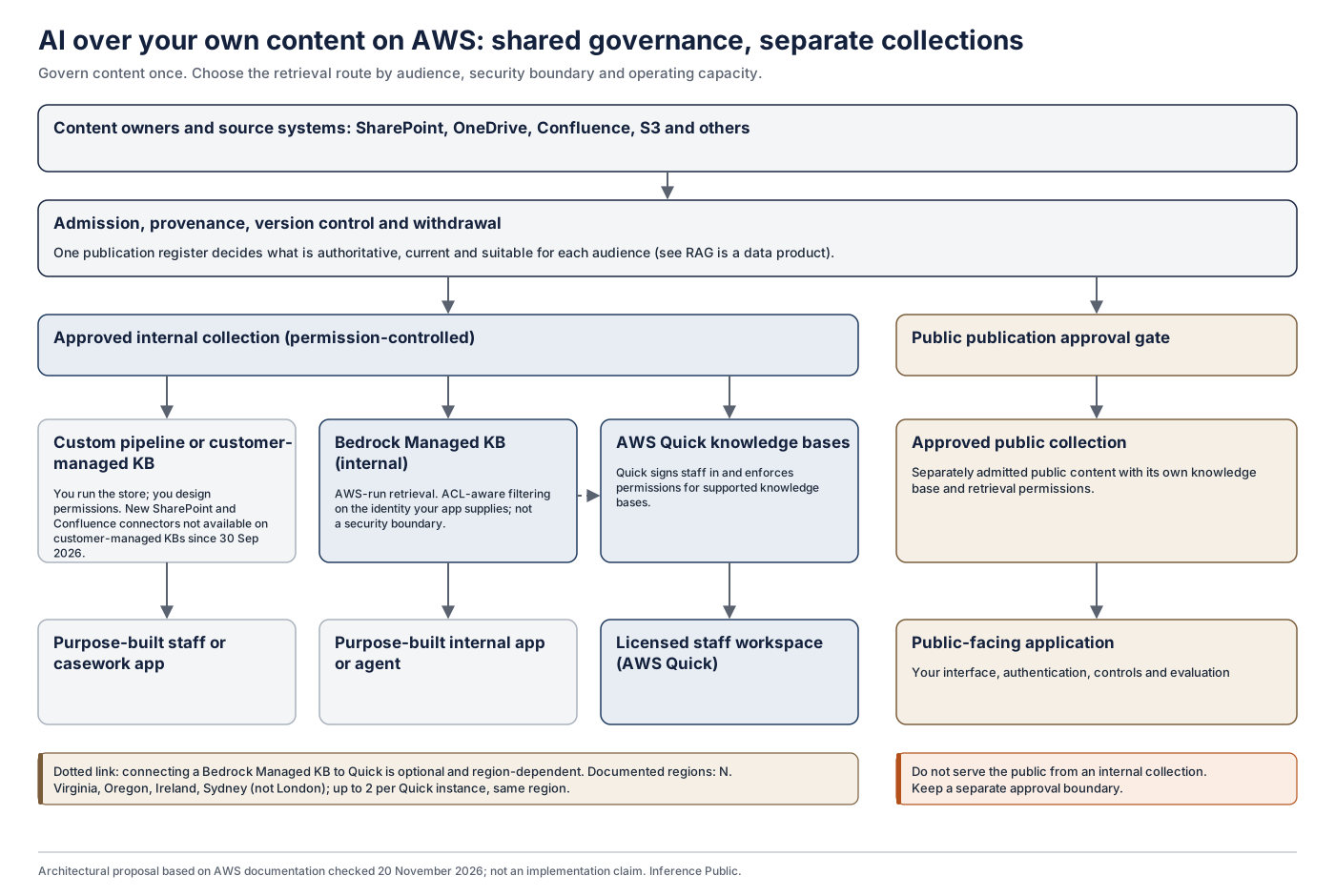
Share the governance, and keep the collections separate.
Where staff and the public depend on overlapping guidance, share the process that establishes what is authoritative, current and suitable for each audience:
- admission
- provenance
- version control
- withdrawal
An internal assistant can then retrieve from a permission-controlled collection, while a public service retrieves from a separately approved public collection.
A common managed knowledge base can sometimes serve several authenticated applications, but only where identity, authorisation, content admission and information boundaries have been designed and tested. Connecting a Bedrock Managed Knowledge Base to Quick also requires the integration to be supported in your region. At present that means US East (N. Virginia), US West (Oregon), Europe (Ireland) and Asia Pacific (Sydney), with up to two managed knowledge bases per Quick instance in the same region. London is not listed.
What every route still needs
The route decides who builds and runs the machinery. It does not decide whether answers are right or whether the service is accountable. Every route needs:
- Owned, current content. A publication register says what is current, and withdrawn guidance stops being used quickly.
- Accurate permissions and matching identities. These must be right in the source systems, not only in the AI layer.
- Retrieved content treated as untrusted. The NCSC's guidance on prompt injection applies to all three routes.
- Evaluation against real questions. This starts before launch and continues afterwards.
- Records and accountability. Decide which outputs are official records, which decisions may be supported or delegated, who may authorise actions, and how inaccurate answers are investigated and corrected. Prompts, outputs and logs held by a public authority can be subject to FOI if you hold them, and personal data in them is covered by the right of access.
If you are moving from Amazon Kendra or Amazon Q Business
Treat the move as a new deployment:
- Sources. Build a fresh source inventory, and confirm that each connector you rely on is supported, with the permission behaviour you need. An existing Kendra index may contain configuration and connector capabilities that cannot be transferred directly.
- Permissions and identity. Retest permissions and identity matching.
- Retrieval. Run your evaluation again, because retrieval behaviour will differ.
- Retention. Review retention settings.
Questions to settle before choosing
- Users. Who are they: staff, the public, or both?
- Destination. Where does an answer go: to a person who checks it, into a workflow, or straight to a member of the public?
- Authority. Who authenticates users, who enforces permissions, and who authorises actions?
- Content. Where is it, and are those systems supported with the permission behaviour you need, in your region?
- Control. How much do you need over parsing, metadata, withdrawal and evidence?
- Capacity. Can you operate what you build for years, rather than just build it?
- Cost. How will it scale across subscriptions, storage and retrieval, including combined Quick and Bedrock charges?
How Inference Public can help
Before recommending a route, Inference Public looks at the information, security, integration and operating requirements involved. If we are engaged to implement a particular AWS product, the scope and commercial arrangements are made explicit.
If you choose AWS Quick, our AWS Quick Readiness, Implementation & Assurance service covers the decisions and testing involved, and what public bodies need to check before switching on AWS Quick sets them out in order.
If your concern is the state of your content more broadly, our AI-ready data assessment looks at documents, metadata and permissions for any AI assistant.
Further reading
Bedrock Managed Knowledge Base GA (17 June 2026)
Managed versus customer-managed knowledge bases
Create a managed knowledge base (connectors and embedding model)
RetrieveAndGenerate API reference
RetrieveAndGenerateStream API reference
AgentCore Gateway managed KB target
Managed KB ACL query behaviour
Quick BYO Bedrock KB limitations
Customer-managed KB connector restriction (30 September 2026)
Amazon Q Business document history
Microsoft 365 Copilot privacy and connectors
NCSC, prompt injection is not SQL injection
Managed knowledge base regions