
Last checked against AWS and UK government sources on 20 November 2026. This guide is based on published documentation. It describes how AWS Quick is documented to behave, which is a different thing from how it behaves in your configuration.
AWS Quick (formerly Amazon Quick) lets staff ask questions of their organisation's own documents, run research across many sources, build reports and automate routine work. For a public body, the appeal is obvious. So is the risk, because an AI assistant that reads your SharePoint will find every permission mistake you have ever made, and it will find them faster than any member of staff could.
Most of the work of adopting Quick safely happens before anyone switches it on. Several of the settings involved cannot be changed once they are made, and others are cheap to get right at the start and expensive to fix later. This guide walks through those decisions in the order you will meet them. For short answers to specific questions, see our AWS Quick FAQ.
If you used Amazon Quick or Amazon Q Business
AWS renamed Amazon Quick to AWS Quick on 9 November 2026. The product is the same, and older guidance under the previous name still applies. Amazon Q Business is no longer open to new customers (July 2026), and AWS points new use cases to Quick. If you are moving from Q Business, treat Quick as a new deployment and work through the decisions below, rather than copying settings across.
Start with what it is for
The first decision is about purpose. Write down which staff will use Quick, for which tasks, over which sources, and who owns each of those sources. Be specific about what is excluded as well: content above OFFICIAL, patient records, case files that only a small team may see, or anything your information governance team has not yet reviewed.
This matters for a practical reason. Every later decision depends on knowing which content will be connected and who should be able to see it. An organisation that starts by connecting "all of SharePoint" has skipped the step that makes the rest of the work tractable.
It also matters for accountability. Your SIRO, data protection officer and information asset owners will need to make decisions about this service. They can only do that against a defined scope.
If you are still deciding between AWS Quick and Microsoft 365 Copilot, read how to choose between Microsoft 365 Copilot and AWS Quick first. The questions in this guide apply to either product, because both depend on the permissions and content you already have.
Decide where it lives
AWS allows one Quick subscription per AWS account. AWS also warns that moving a Quick account that uses IAM Identity Center into an AWS organisation without that Identity Center instance permanently prevents all users from signing in. Plan any account move before a merger or transfer of functions. A dedicated account inside your landing zone is usually the sensible default, since it keeps Quick's billing, logs, encryption keys and administrator access apart from other workloads. Assess that recommendation against your own landing zone and administration model before adopting it.
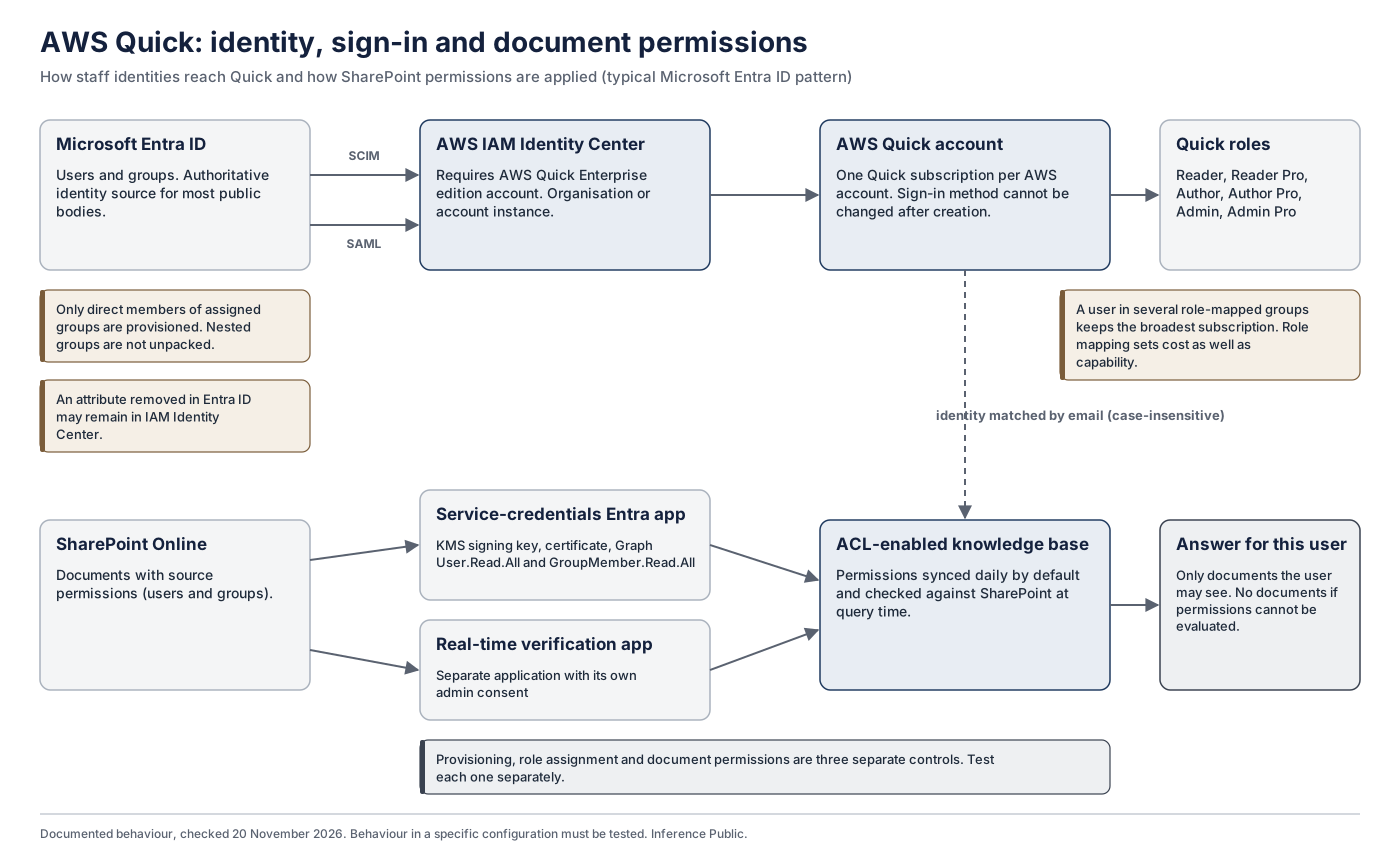
The account also needs the right edition. One way for staff to use their existing Microsoft accounts is AWS IAM Identity Center, which requires an Enterprise edition account. The account edition is a separate thing from each user's subscription tier, so an Enterprise edition account can still have most users on cheaper subscriptions.
Quick has been available in the London region since March 2026. Check that the features you plan to use are available in London for your tier. One notable gap: connecting Quick to a Bedrock Managed Knowledge Base is documented only for some regions, and London was not one of them at 20 November 2026.
Settle identity before anything else
The sign-in method cannot be changed after the Quick account is created. For most public bodies the pattern is Microsoft Entra ID as the identity provider, with users and groups provisioned into IAM Identity Center through SCIM and sign-in through SAML, as described in AWS's Entra ID guidance. Organisations still running on-premises Active Directory can synchronise from it, although many already synchronise AD into Entra ID, which is usually the simpler source.
Three identity details deserve attention early.
Groups decide both access and cost. Quick has six roles, from Reader to Admin Pro, each tied to a subscription tier. Roles are usually assigned by group. Where someone belongs to several mapped groups, they keep the subscription that grants the broadest access, which can be a higher-priced subscription than intended, so a careless mapping can put many staff on a dearer tier. Design the mapping with your finance team as well as your identity team.
Nested groups are not unpacked. Only direct members of assigned groups are provisioned. If your Entra ID groups rely on nesting, some staff will simply not appear in Quick.
Email addresses join everything together. Quick matches users to document permissions by email address. Where addresses are recycled when staff leave, follow AWS's safe order: update the permissions, refresh the knowledge base, then reassign the address.
Decide about encryption keys deliberately
Many public bodies have a policy that favours customer-managed encryption keys. Quick supports them, but only with an Enterprise subscription, and with consequences that need to be understood before the choice is made.
The key used for Quick's AI data is fixed the first time that data is created and cannot be changed afterwards. If that key is disabled or access to it is denied, the data becomes unreadable until access is restored. If it is permanently deleted, the data cannot be recovered, and restoring the service means unsubscribing and subscribing again, which deletes everything in Quick. Accounts that use customer-managed keys also lose chat memory.
None of this is a reason to avoid customer-managed keys. It is a reason to decide on purpose, with your SIRO, and to put safeguards in place before the key is first used: policies that stop anyone except a named role from disabling or deleting the key, alerts on key changes, and a recovery runbook.
Fix the permission model per knowledge base
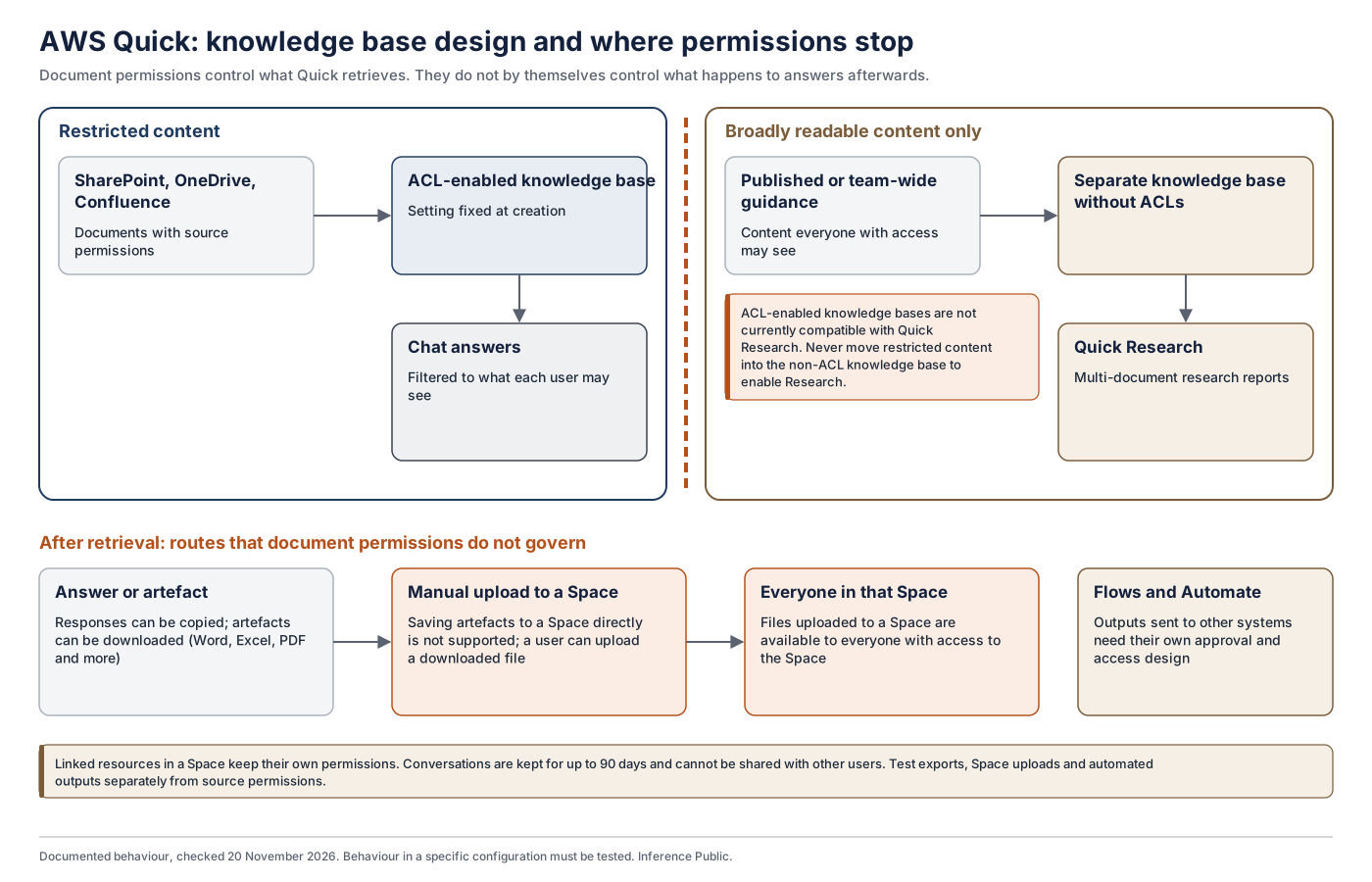
Quick connects to sources such as SharePoint, OneDrive, Confluence and Amazon S3 through knowledge bases. Whether a knowledge base enforces each document's own permissions is fixed when the knowledge base is created. To change it, you build a new one.
With document permissions enabled, Quick returns only what each user is allowed to see in the source. For SharePoint, admin-managed OneDrive and Confluence Cloud, it also checks access against the source when it returns results, and if it cannot evaluate permissions it returns nothing. That is a strong design, but it protects you only when the source permissions are right, identities match, and the connector supports these checks.
Two limits shape the design.
Research and permissions do not mix.Knowledge bases with document-level permissions are not compatible with Quick Research. If you want Research, give it a separate knowledge base containing only content that everyone with access may see. Never remove permissions from restricted content to make Research work.
Answers travel further than documents. Document permissions control what Quick retrieves. They do not control what happens to an answer afterwards. Files uploaded directly to a Space are available to everyone with access to that Space, and staff can download generated documents and put them anywhere. Decide how outputs may be shared, exported and acted on, and test those routes too.
Look hard at the content itself

An assistant is only as good as what it reads. Before connecting a source, ask who owns it, whether superseded versions have been withdrawn, and whether the permissions reflect the organisation as it is now rather than as it was three restructures ago. Reorganisations leave a long tail of stale groups and inherited access, so departments going through machinery of government changes, and councils going through reorganisation, need to take particular care.
We set out the wider argument in treating RAG as a data product. The short version is that content readiness is ongoing work with named owners, rather than a clean-up done once before launch.
If you are weighing Quick against building your own retrieval service, Build RAG, use Bedrock Managed Knowledge Base, or adopt AWS Quick? compares the three routes.
Plan for records, information rights and transparency
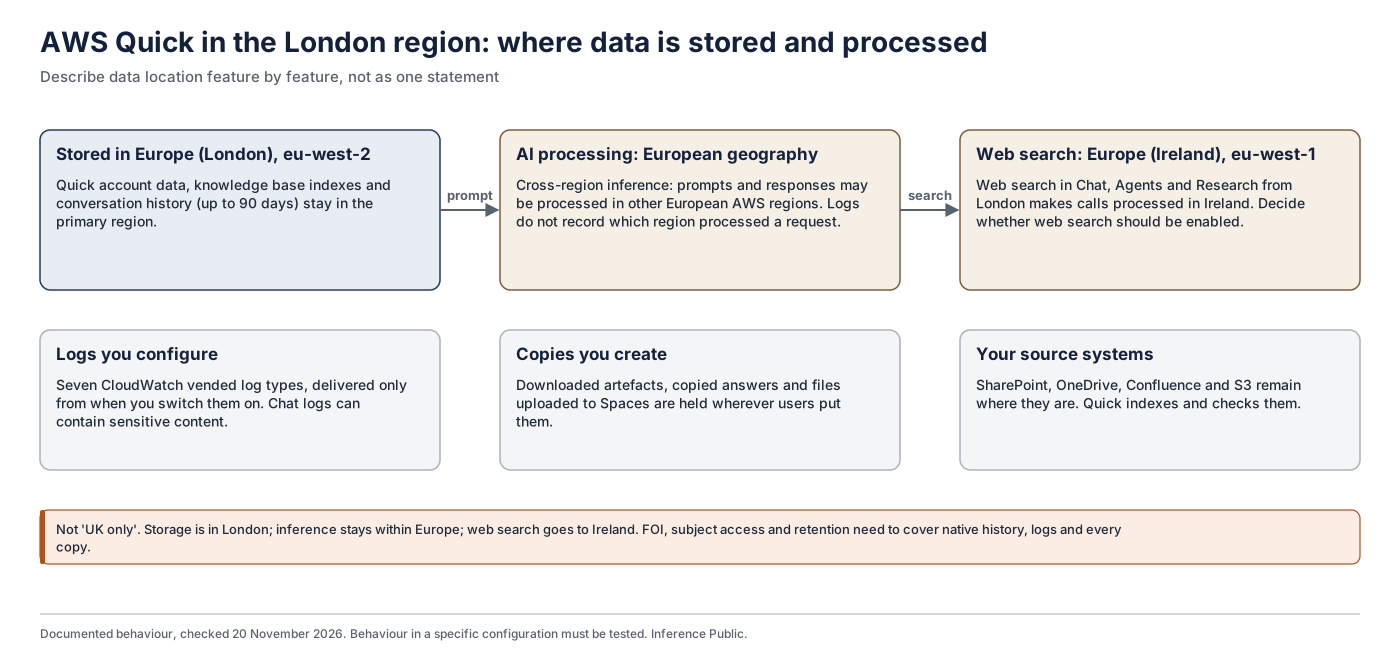
Quick keeps chat conversations for up to 90 days, and staff can copy answers and download files. Logs of what staff ask can be delivered to CloudWatch, but only from when delivery is configured. Information may therefore sit in four places: native history, downloaded files, log copies and official records.
The ICO says that information generated by AI for work, and the prompts used, is subject to FOI if you hold it, and that stored conversations and past prompts are recorded information. Personal data in them is also covered by the right of access. Before rollout, know how you will find, preserve, retain and delete each kind.
Two screenings belong at this stage as well. A DPIA is required where processing is likely to result in high risk, so screen each use case and record the outcome. The Algorithmic Transparency Recording Standard is mandatory for central government departments and for arm's-length bodies that provide public or frontline services or routinely interact with the public, where a tool has a public effect. It is recommended across the wider public sector. Record your reasoning either way.
Data location also needs describing feature by feature. In London, data is stored in the London region, AI processing may use other European regions, and web search is processed in Ireland (AWS regions guidance).
Write the decisions down and get them signed
By this point you have made a set of choices: the account, the sign-in method, the key, the permission setting for each knowledge base, the Research design and the region. Some cannot be reversed. Record each one, with the evidence behind it and the person who has authority to make it, and get the record signed before any configuration starts.
Our sample configuration decision record shows one way to do this, using a fictional council. The point of the record is accountability. Advisers, including us, can provide evidence and recommendations, but the decisions and the acceptance of residual risk belong to your own officers.
Pilot, test, then decide
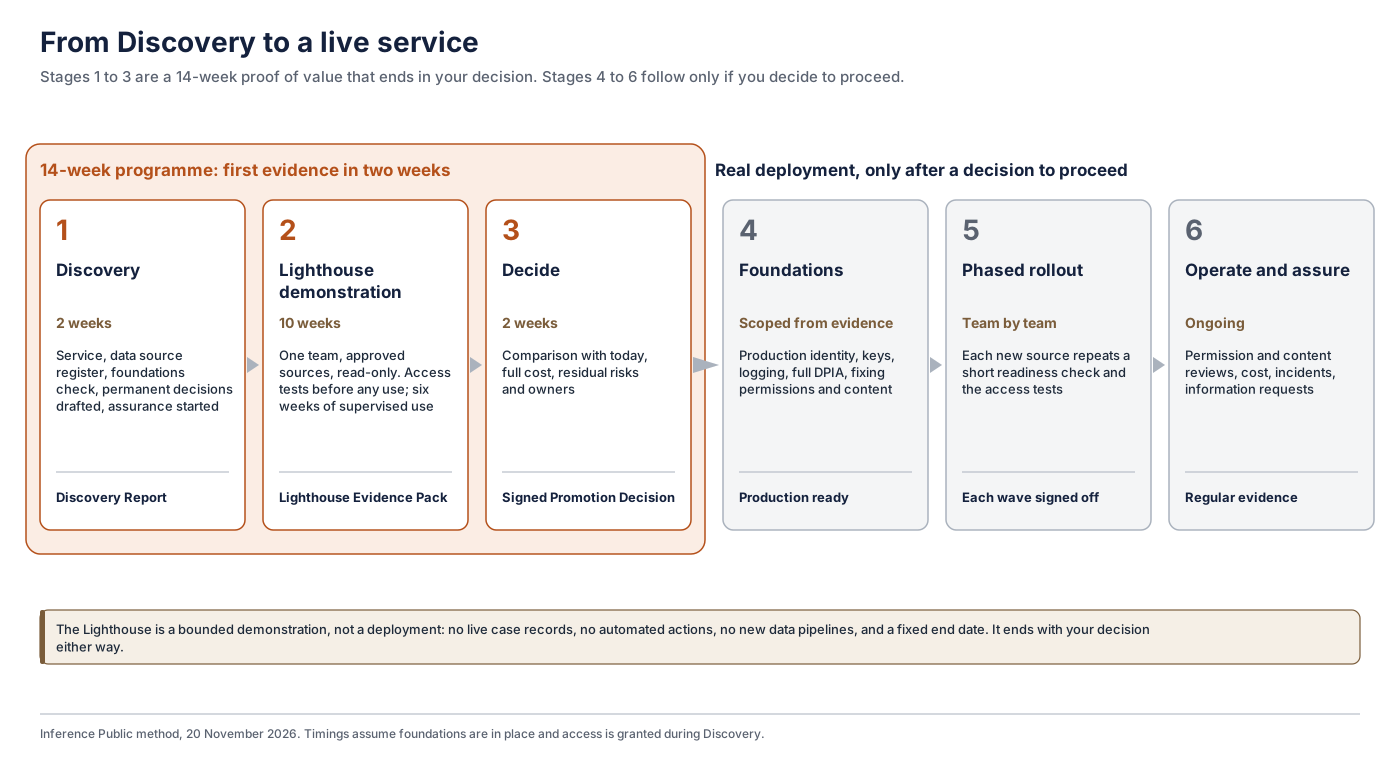
A bounded pilot, kept to one team, approved sources and read-only use, is where documented behaviour meets your actual estate. Test access with representative users, including people who should be refused. Test what happens when a permission is revoked, when someone leaves, and when SharePoint or your identity provider is unavailable. Evaluate answer quality against a fixed set of real questions. Confirm that logs arrive and can be searched, and that costs match the model.
Only then should your accountable officers decide whether to expand. A pilot should not move into wider use with an untested access control or an information risk nobody has accepted.
Where to go next
- Work through the AWS Quick readiness checklist, a free self-check covering every area above.
- Read the use cases for councils, central government and health for where Quick could help.
- If you would like help, our AWS Quick Readiness, Implementation & Assurance service starts with a two-week Discovery and a bounded Lighthouse demonstration with one team, ending in a decision your officers sign.
- For why a working demonstration is not the same as evidence, read why a convincing AI demonstration is not evidence that a public service works.