
Last checked against AWS, Microsoft and UK government sources on 20 November 2026. AWS Quick changes often. Each answer links to its source, so check it before relying on a detail.
Public bodies across central government, local authorities, the NHS and arm's-length bodies are looking at AWS Quick. Most want staff to use AI over the documents they already hold. These answers draw on AWS and Microsoft documentation and on UK guidance.
They describe how the product is documented to behave. They do not describe how it will behave in your configuration, which has to be tested. Many of the decisions involved belong to your SIRO, DPO, information governance team or technical design authority, and we say so where that applies.
About AWS Quick
What is AWS Quick?
AWS Quick is an AI workspace from Amazon Web Services. It brings together:
- a chat assistant
- a research agent (Quick Research)
- shared Spaces
- workflows (Quick Flows) and automation (Quick Automate)
- business intelligence (Quick Sight)
It connects to sources such as SharePoint, OneDrive, Confluence and Amazon S3 through knowledge bases, so staff can ask questions of their own organisation's content.
Is AWS Quick the same as Amazon Quick?
Yes. AWS renamed Amazon Quick to AWS Quick on 9 November 2026, and Amazon Quick Sight became AWS Quick Sight. Earlier names include Amazon Quick Suite and, for the reporting component, Amazon QuickSight.
How does it relate to Amazon Q Business?
Amazon Q Business is no longer open to new customers (July 2026), and AWS points new use cases to Quick (availability change). If you move from Q Business, treat it as a new deployment. Review sources, permissions and retention rather than copying the existing configuration across.
Is it available to UK public bodies?
Quick has been available in the AWS Europe (London) region since 25 March 2026. Confirm the exact features available in London for the subscription tier you plan to use before you design around them.
Account, identity and sign-in
Which decisions cannot be changed later?
Several are permanent, or costly to reverse. Decide them before you create anything:
- The AWS account that holds the subscription. AWS allows one Quick account subscription per AWS account. AWS also warns that moving a Quick account that uses IAM Identity Center into an AWS organisation without that Identity Center instance permanently prevents all users from signing in.
- The sign-in method. The identity method cannot be changed after the Quick account is created.
- Customer-managed encryption for Quick's AI data. The key is fixed when that data is first created (see below).
- Whether each knowledge base enforces document permissions. This is fixed when the knowledge base is created.
We recommend recording these choices in a signed decision record before any configuration starts.
Can staff sign in with their existing Microsoft accounts?
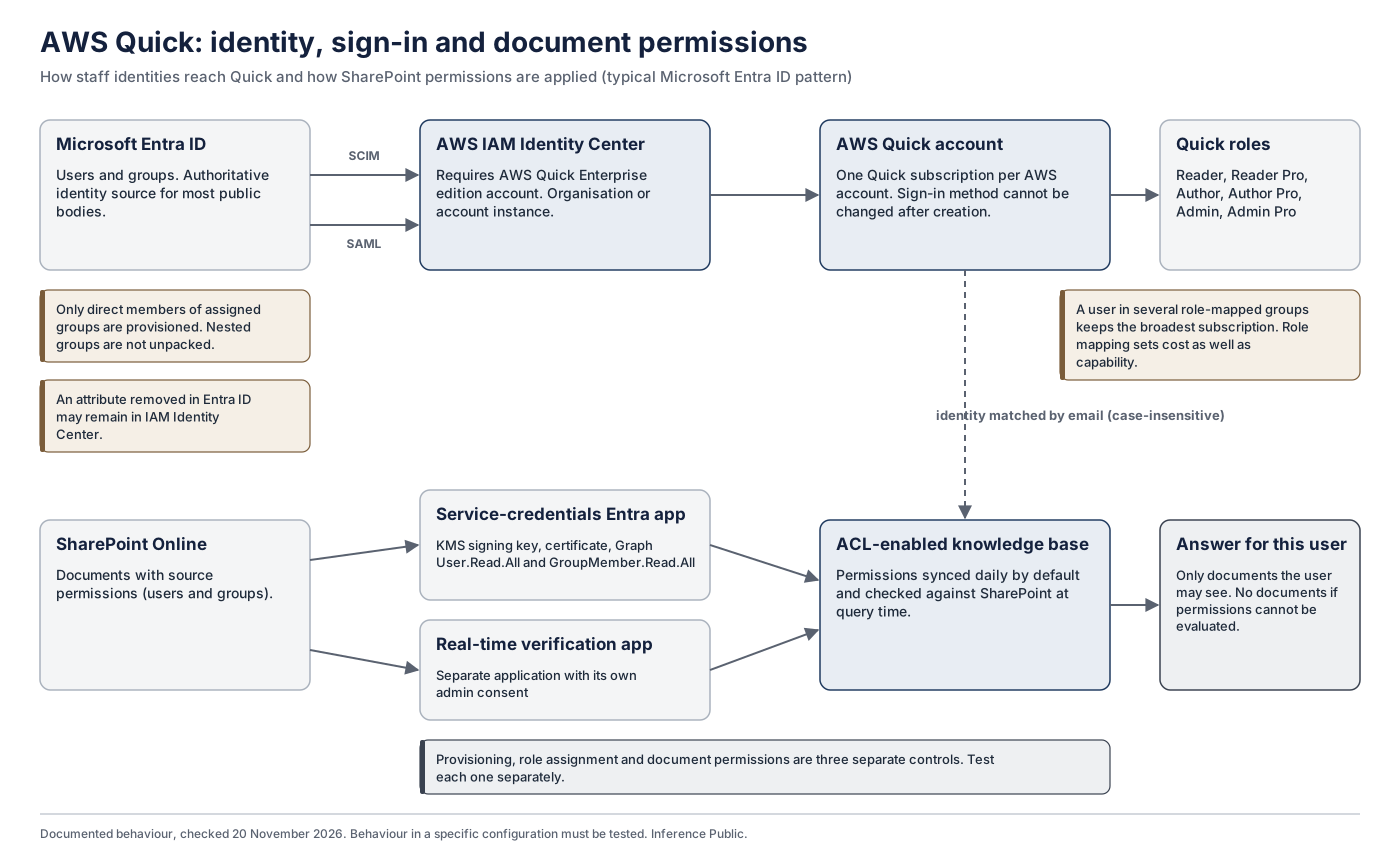
Yes. One way is through AWS IAM Identity Center, which requires the Quick Enterprise edition account. The usual pattern with Microsoft Entra ID is:
- Entra ID is the identity provider.
- Users and groups are provisioned into IAM Identity Center using SCIM 2.0.
- Sign-in uses SAML 2.0, as described in AWS's Entra ID guidance.
An Enterprise edition account can still have users on different subscription tiers. The account edition and per-user licensing are separate decisions.
What about on-premises Active Directory?
IAM Identity Center can synchronise from Active Directory as well as from Entra ID. Many hybrid estates already synchronise AD to Entra ID, so Entra ID is often the simpler source. Decide which directory is authoritative, because document permissions depend on identities matching.
What roles do users have, and how do they relate to cost?
Quick has six roles:
| Role | Subscription |
|---|---|
| Reader | Essentials |
| Reader Pro | Professional |
| Author | Quick Sight Author |
| Author Pro | Enterprise |
| Admin | Same as the Quick Sight Author subscription |
| Admin Pro | Administration of Quick, equivalent to Enterprise |
Roles can be assigned through group membership. The role mapping therefore decides both what people can do and what you pay. If a user belongs to several groups mapped to different roles, they keep the subscription that grants the broadest access. Removing someone from one Enterprise-mapped group may therefore not downgrade them, and AWS notes that changes can take up to five minutes to apply. Quick roles are also separate from AWS IAM permissions. When Quick is integrated with IAM Identity Center, some settings, such as security, network and encryption keys, are governed by IAM rights rather than by a Quick administrator role.
Are there known gaps in Entra ID provisioning?
Two are documented:
- Nested groups. Microsoft and AWS document that only direct members of assigned groups are provisioned, and nested groups are not unpacked.
- Removed attributes. An attribute removed from a user in Entra ID may remain in IAM Identity Center.
These affect who exists in Quick and with what attributes. That can leave staff without access they need, or leave identity records out of date. On their own they do not show that anyone can see documents they should not, because document permissions are checked separately. Test provisioning, role assignment and document permissions as three distinct things.
How does Quick match users to document permissions?
By email address, which Quick treats as case-insensitive. Addresses are bound to Quick users when they first use chat.
If an address is reassigned to a new member of staff, AWS documents that Quick locks access for that address to protect data, and advises contacting Quick support to clean up the previous user's access before the new holder can access those documents. There is a narrower remaining risk. If the previous holder never used Quick, and the address is reassigned before permissions refresh, the new holder could temporarily see documents meant for the previous one. AWS's safe order is:
- Update the permissions.
- Refresh the knowledge base.
- Reassign the address.
Where Quick uses a Bedrock Managed Knowledge Base, the email must match exactly in each source. If it doesn't, the user simply gets no results. Connecting a Bedrock Managed Knowledge Base to Quick is currently documented only for some regions, and London was not among them at 20 November 2026.
What does SharePoint integration need in our Microsoft tenant?
An admin-managed SharePoint knowledge base needs the following (setup, permissions):
- an AWS KMS signing key and a certificate
- an Entra application registration with the Microsoft Graph permissions User.Read.All and GroupMember.Read.All, used to read permissions
- SharePoint permission Sites.FullControl.All, or Sites.Selected with permissions granted per site
- a separate application for the real-time permission check, which has its own admin consent
Users may be prompted to sign in to SharePoint when an answer draws on permission-controlled content. Involve your Microsoft 365 administrators from the start.
Which AWS account should Quick run in?
Because each AWS account supports one Quick subscription, the account choice matters. A dedicated account inside your landing zone is a sensible default, because it keeps the following separate from other workloads:
- billing, including the account fee
- logs
- keys
- administrator access
Treat this as a recommendation to assess against your landing zone, your existing IAM Identity Center deployment and your administration model. It is not a fixed rule.
What happens when someone leaves?
Users managed through IAM Identity Center can lose Quick access when they are removed from groups or deleted. Quick keeps their inactive user record and the assets they own until an administrator transfers or deletes them. A leaver process should cover:
- the identity provider
- Quick user and asset ownership
- source permissions
- knowledge base ownership
Admin-managed knowledge bases should have at least one additional owner.
Encryption
Can we use our own encryption keys?
Yes, with conditions. Customer-managed KMS key support requires an AWS Quick Enterprise subscription. Keys must be symmetric and in the same account and region as your Quick resources. Before choosing this, understand three consequences:
- The key for Quick's AI data (the Amazon Q data key) is permanent. It is set the first time that data is created and cannot be changed afterwards. This applies specifically to the Amazon Q data key; other Quick data uses the account's default key under different rules. Rotating key material keeps the same key and does not change this association.
- Losing access to that key means losing access to the data. If the key is disabled, access to it is denied, or it is scheduled for deletion, the data becomes inaccessible until the original key is restored. Registering a different key does not help. If the key is permanently deleted, the data cannot be recovered, and restoring the service means unsubscribing and subscribing again, which deletes all Quick data.
- Chat memory is unavailable. Accounts that use customer-managed keys do not support chat memory.
If your security policy requires customer-managed keys, settle the licensing and key-management arrangements first. Before the key is used, put administrative safeguards in place against disabling or deleting it. For example: IAM or service control policies that deny kms:ScheduleKeyDeletion and kms:DisableKey to all but a named role; review of the key policy and grants; alerts on key changes; and a recovery runbook. Check DescribeKeyRegistration before changing any key.
Data and processing location
Where is our data stored and processed?
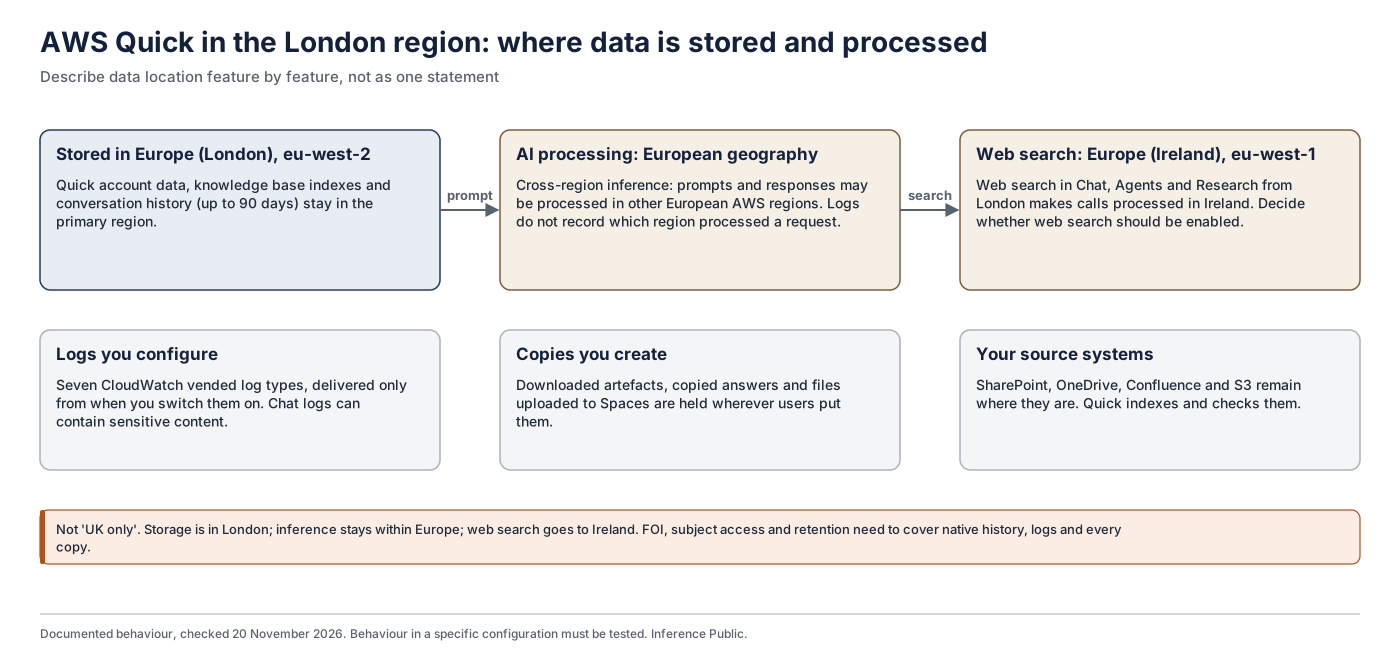
When Quick runs in London:
- Storage.Your data is stored in the London region.
- AI processing. This uses cross-region inference within AWS's European geography, so prompts and responses may be processed in other European regions.
- Web search. Web search in Chat, Agents and Research is processed in Europe (Ireland).
- Logs. CloudWatch and CloudTrail logs do not record where inference took place.
Describe data location feature by feature, and decide whether web search should be enabled.
Does AWS use our data to train its models?
AWS states that "AWS Quick does not use customer data for training or improving underlying LLMs" (AWS data protection documentation). Check the current version before relying on it.
Can Quick connect to systems on our private network?
Only for some sources. AWS documents VPC connections for Quick Sight structured data sources and Amazon Redshift knowledge bases. SharePoint, OneDrive, Confluence, S3 and Bedrock Managed Knowledge Bases do not use a Quick VPC connection. Confirm the exact connection type for each source you plan to use.
Permissions and access control
Will staff only see documents they are allowed to see?
For knowledge bases with document-level access control enabled, Quick enforces the permissions held in the source. For SharePoint, admin-managed OneDrive and Confluence Cloud, it also checks access against the source when returning results. For Confluence, if that check fails, users see an error asking them to retry. If it cannot evaluate permissions, it returns no documents.
This protects you only if three things hold:
- the source permissions are correct
- identities match
- the connector you use supports these checks
Test with representative users before rollout, including users who should be refused.
Does controlling access to documents also control answers, exports and actions?
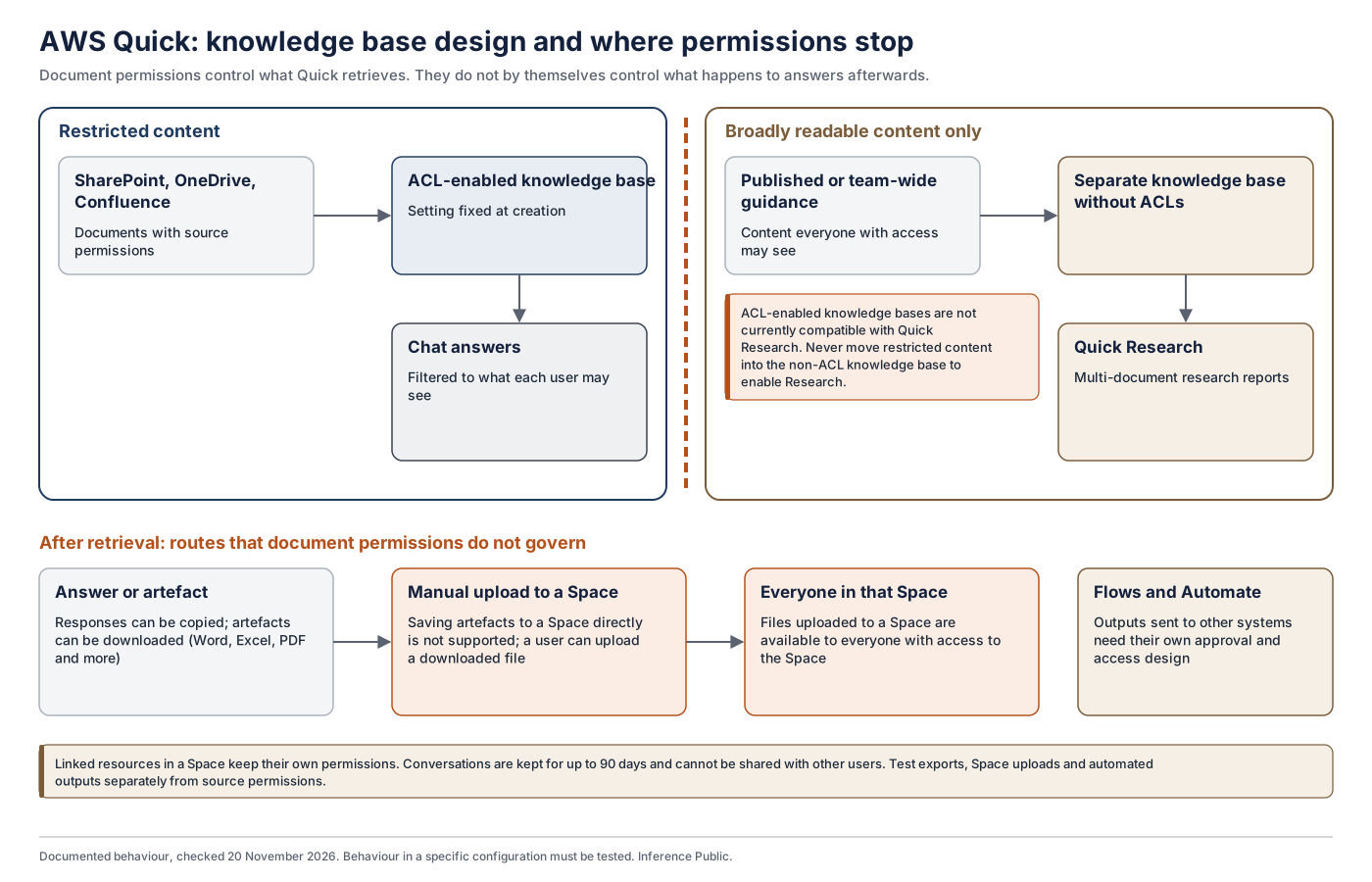
Not by itself. Document permissions control what Quick retrieves for a user. Once an answer exists, what happens to it depends on other controls:
- whether it is shared or placed in a Space
- whether it is exported or sent to another system by a workflow
- whether an automated action uses it
Each needs its own decision and testing. Spaces are a specific example. Linked Quick resources in a Space keep their own permissions, but files uploaded directly to a Space are available to everyone with access to that Space. Artefacts cannot be saved to a Space directly, but a user can download one and upload it. If that artefact was derived from restricted documents, a broadly shared Space becomes a new route to the information.
Treat retrieval permissions as one control in a wider information lifecycle.
Can we turn document permissions on later?
No. The setting is fixed when a knowledge base is created. To change it, you create a new knowledge base.
How quickly do permission changes take effect?
Permissions sync daily by default. For connectors with real-time verification (SharePoint, admin-managed OneDrive and Confluence Cloud), access is also checked when results are returned, so a revoked permission takes effect sooner. S3 knowledge bases rely on sync. Test the behaviour for each connector you use.
Can administrators check who can see a document?
Yes. ACL verification lets administrators check whether a specific user can access a specific document in a permission-controlled knowledge base.
Can Quick Research use permission-controlled documents?
Not at present. Knowledge bases with document-level permissions are not compatible with Quick Research. The workaround is a separate knowledge base without permissions. Use it only for content that everyone with access may see. Do not remove access controls from restricted content to make Research work.
What happens if SharePoint or our identity provider is unavailable?
AWS documents that an ACL-enabled knowledge base returns no documents where Quick cannot evaluate the necessary permissions, rather than unfiltered results. Beyond that, behaviour depends on the connector, the session and the configuration. A SharePoint outage, a failed real-time check, an IAM Identity Center disruption and an Entra ID sign-in outage may each behave differently. Do not assume that an identity-provider outage ends existing sessions immediately, or that every connector behaves the same way. Test the failure modes your service depends on and record the results.
Records, logging and information rights

What happens to conversations and generated files?
AWS Quick keeps chat conversations for up to 90 days. Documents uploaded in chat are deleted with the conversation after 90 days of inactivity. Users cannot share conversations with each other. They can copy responses and download artefacts such as Word, Excel and PDF files, and those copies are held wherever users put them. CloudWatch logs are separate and are only captured from when delivery is configured.
Information may therefore be held in four places:
- native conversation history
- downloaded or exported files
- log copies
- official records into which content has been incorporated
Your FOI, subject access, preservation and records arrangements need to cover each of them. Do not rely on the native 90-day history.
Does Quick keep logs of what staff ask?
Quick can deliver seven types of log to CloudWatch Logs, Amazon S3 or Amazon Data Firehose:
- chat
- feedback
- agent hours
- agent metadata
- index usage
- knowledge base file sync
- data loss prevention (DLP)
Delivery must be configured, and it only applies from that point onwards. Chat logs can contain personal and sensitive content, so control who can read them and how long they are kept. CloudTrail records API activity, and AWS directs you to CloudWatch logs rather than CloudTrail for chat conversation content.
Do FOI and subject access requests apply?
Yes. The ICO says that information generated by AI for work, and the prompts used, is subject to FOI if you hold it, and that stored conversations and past prompts are recorded information. Personal data in them is also covered by the right of access. Before rollout, know how you will:
- find relevant conversations and outputs
- preserve and retrieve them
- retain and delete them
This is general information and should not be relied on as legal advice.
How do we distinguish AI-generated content from authoritative records?
Quick produces drafts, summaries and answers. It does not produce approved policy or decisions. Agree how generated content is labelled, where it may be stored, and what review it needs before it becomes part of an official record or is sent to the public.
Do we need a data protection impact assessment?
A DPIA is required where processing is likely to result in high risk to individuals. Innovative technology and large-scale processing of personal data are relevant indicators. Screen each use case early and document the outcome. Complete a full DPIA where the screening indicates one, before sources are connected.
Do we need an ATRS record?
The Algorithmic Transparency Recording Standard is mandatory for ministerial and non-ministerial departments, and for arm's-length bodies that provide public or frontline services or routinely interact with the general public. It applies to tools that significantly influence decisions with a public effect, or that interact directly with the public. It is recommended across the wider public sector.
An internal staff assistant may fall outside the mandatory scope. A tool that shapes decisions about the public is more likely to be in scope. Record your reasoning either way.
Public sector requirements
Can AWS Quick be used for OFFICIAL information?
That is your organisation's decision, informed by your SIRO and security team. Assess Quick as you would any new cloud service, for example against the NCSC cloud security principles. Take account of its specific data flows, including cross-region inference and web search, and decide which content and features are appropriate. Do not connect material above OFFICIAL.
What government guidance applies?
The main references are:
- the AI Playbook for the UK Government
- the Code of Practice for the Cyber Security of AI (voluntary, January 2025)
- GDS guidelines on making government datasets ready for AI
- the NCSC's guidance that prompt injection is not SQL injection, which matters because Quick reads documents that may contain text written to manipulate an AI system
What about NHS organisations and patient information?
Three kinds of use carry different levels of risk:
- Corporate document search, such as HR or estates policies.
- Clinical guideline retrieval, which can affect care even without patient-identifiable data.
- Patient-specific decision support.
Where a use could affect care, apply NHS clinical safety standards, including DCB0129 and DCB0160 as applicable, with a named Clinical Safety Officer. Seek Caldicott advice for patient information. Whether software qualifies as a medical device depends on its intended purpose and functionality. A general productivity tool is not automatically a medical device, but a particular implementation may need assessment.
In June 2026 NHS England announced Microsoft 365 Copilot for 505,000 staff, so be clear which tool is used for what. For social care, see the DfE and DHSC guidance on AI in social care, published on 20 November 2026.
We already use Microsoft 365. Why consider Quick?
Most public bodies run Microsoft 365 and will consider Copilot, which deserves equal consideration. Its connectors and agents can also reach beyond Microsoft 365. Quick connects to SharePoint and OneDrive as well as to other sources. It may suit organisations with an existing AWS relationship, or with knowledge and data outside Microsoft 365, or a need for its research, reporting or automation features. The readiness questions about permissions and content apply whichever product you choose.
What happens after a reorganisation or machinery of government change?
Permissions and ownership often outlive the structure they reflected. Review source permissions, group membership, role mapping and knowledge base ownership whenever teams, functions or organisations change. The account decisions above matter here too, because a Quick subscription is tied to one AWS account. Our article on machinery of government changes and AWS Organizations covers the wider account and data implications.
Costs and buying
How much does AWS Quick cost?
AWS's published prices for organisation plans at 20 November 2026 are:
- Essentials: $3 per user per month
- Professional: $20 per user per month
- Enterprise: $40 per user per month
- plus an infrastructure fee of $250 per account per month
Plans include different allowances of agent hours and pooled index storage, and usage above them is charged. A 30-day trial waives the subscription fee for up to 25 users and the $250 account fee. After it, AWS states that customers start being billed for an Enterprise plan.
Prices are in US dollars. Confirm UK contractual pricing and any public-sector terms with AWS or your reseller. Model costs on your intended mix of roles, not a single tier.
How can we buy it?
Through an existing AWS agreement or an AWS reseller. Professional services to help you adopt Quick are bought separately.
Adopting Quick safely
What should we check before switching it on?
At minimum:
- the irreversible account, identity, encryption and knowledge base decisions above
- whether source permissions are accurate and identities match
- who owns the content and how superseded material is withdrawn
- which content can be used in Research
- what happens to answers, exports and automated actions
- log delivery, retention and FOI retrieval
- DPIA and ATRS screening
The free AWS Quick readiness checklist covers each of these, and the sample configuration decision record shows how to record the permanent decisions. For the reasoning in sequence, see what public bodies need to check before switching on AWS Quick.
What evidence do we need before moving from a pilot to full use?
At least:
- tested positive and negative access results for each connector
- an evaluation of answer quality against a fixed set of real questions
- working log delivery and retrieval
- an agreed incident and support route
- a cost model based on actual usage
- a signed decision from the people with authority to accept the residual risks
A pilot should not move into operational use with an untested mandatory access control or an unaccepted information risk.
How can Inference Public help?
Inference Public offers a three-stage programme of about 14 weeks:
- Discovery (2 weeks): one service, its data, foundations and permanent decisions, ending in a Discovery Report and a draft decision record for your officers to sign.
- Lighthouse demonstration (10 weeks): a bounded, read-only demonstration with one team on approved sources, ending in a Lighthouse Evidence Pack.
- Decide (2 weeks): a comparison with today's way of working, ending in your Signed Promotion Decision.
After a decision to proceed, Quick Scale & Assurance supports foundations, phased rollout and ongoing reviews.
See our use cases for councils, central government and health, and how AWS Quick compares with building on Bedrock. Details are on AWS Quick Readiness, Implementation & Assurance. If you are comparing products, see how to choose between Microsoft 365 Copilot and AWS Quick.
All insights